

Hey There! Welcome To My Blog
First of all, thanks for visiting my personal website.
I hope you enjoy spending time here, as I did by creating it. There will be stories, tips and practices about .NET and software in general. My aim is to share my knowledge and experience which I am actively building on as you do.
Learning never stops, right? Then, let's start!
Long Ago, Before This Website
There were two other...
I was a Star Wars fan as a kid growing up, I loved it enough to make a website about it during last year of the elementary school. I cannot remember everything about it but I remember that it has a black background, Star Wars logo as a banner and few pages where I shared some information about the movie. I also remember the address: starwars.8bit.co.uk yet it cannot be accessed anymore, it's long gone as with the all access information I had with it.
All made with HTML, CSS and maybe a bit of JavaScript, I also developed one during my high school years. Mostly I figured out things via trial and error but like how to center a div or put videos, you got to read some books or search using dial-up internet 😂 Which was a real pain uploading my site using CuteFTP at few KBs per second.
Site was full of WWE content, was a big fan back then. Also, I dedicated a page for my friends where I shared photos and videos of the time we spent together during those years.
Funnily enough, it had been active until two or three years ago without doing any maintenance or update to it, as access information of this one was also long gone. But during all these years it kept working regardless that hosting site was out of business. And yes the address: atik.atwebpages.com which can be viewed in web.archive.org but only texts are available as it seems. I also created funny animations in Macromedia Flash (before Adobe), I forgot where I hosted them. It was hard to find free hosting servers at the time and they were flaky.
Ambitious and fun years of trying and making new stuff, if only I knew how to back those up somewhere safe (no ☁️ sadly).
C++, Java, C#, .NET, Blazor!
In that order...
I always knew that I'm gonna do something about computers when I grow up, whether it's hardware or software. It's because I was introduced to technology early on and since that my brain picked that up quickly, was drawn into it.
I was and still am the guy from my environment as a "go-to" person for any computer related thing. New hardware not acting up? Ask me to troubleshoot it. Memory overclock fundamentals? Here's the guide I follow. Malware infected PC and internet can't be turned on? Let's look into msconfig and then Windows services to revert shady actions before doing system scan (happened to a family member 😐). And other countless cases that always include some part of hardware and software.
So I had to become an engineer. Throughout college years I was involved in C/C++ lectures and loved it. Next step for me to discover Java, the "works everywhere" programming language, even in your car, thanks to its runtime works in a virtual machine. I took a lecture on it and did some good stuff, including GUI applications. A year later on, I discovered C#. Well, I've known that it was out there, but never had the chance to use it. As a new C# newcomer from Java, I was impressed by the language because it just clicked in me that it looks like Java but only better.
- Convenient collection actions with LINQ code
- Simple concurrency with async/await
- Fast and easy field encapsulation with { get; set; } (even more flexible now with "field-backed properties" from C# 14)
These are the things that came up to my mind now that gave me good vibes back then. So I kept writing in C# and got into .NET ecosystem.
Enough History Already, Why Blazor?
3 mins in...
You get different answers every time because people have biases or legit reasons. I have both. Let me elaborate...
I have extensively used Web Forms and MVC in my line of work, Blazor was the final step for me to look into because I needed SPA framework and .NET ecosystem had an answer for it. It wasn't this good a few years ago but was still on the right direction. On top of that, coming from all .NET back-end systems, it just made total sense to use C# again in Blazor. Because not only I love it, but also it would be easy for me to code (have some shared classes etc.) So there's my bias in that.
Now the legitimate reasons. Let's compare against JavaScript frameworks as they are the alternative. ASP.NET Core back-end is faster, more performant than the competition, plus having all-in-one solution including AI integrations, I could never stop using it, it just doesn't make single sense.
Fortunes responses per second
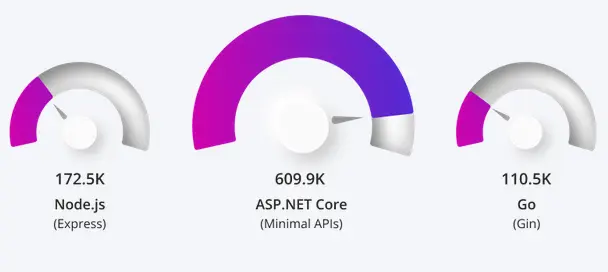
On the front-end side, JavaScript world lives in a framework hell with meta-frameworks; controlling frameworks with another framework, giving you friction and exhaustion. Switching between them slows you down, tooling becomes complex and you have this dependency hell as well which may break after updates, have conflicts and security vulnerabilities. This also increases total number of files in your project leading bigger sizes, thus slow loading times.
Whereas Blazor, backed by Microsoft's ecosystem (don't even get me started on the Silverlight thing again), prevents all that and gives you a stable modular framework that has everything under your hand, security and performance first in mind development. For libraries, sure NPM is large, but NuGet is keeping up and there wasn't a single time I couldn't find a package I wanted.
Blazor WebAssembly (WASM) (closest to what React does) can give you server pre-render right away to speed up initial load time and give user something to see without waiting, then continue work on client side. Leads to better SEO, UX and performance at hand.
Now there is also an emerging JavaScript vs. C# in here as well. I can't say this enough: I hate JavaScript 😁
1. Dynamic typing: no compile-time checks, leads to runtime surprises.
2. Weak typing: types are not checked or distinguished.
It is so easy to fall into weird and inconsistent behaviors, I know I did and debugging is tiresome. Syntax can also become indirect especially in async. codes look bad, or that's just me and my preference.
But hey, thanks to Microsoft again that there is TypeScript language; a superset of JavaScript which has static and strong typing like C#. The only thing that makes me comfortable to go into React framework if I really need to in future. Other than that, I think we can all now stop saying Blazor is not suitable for public facing sites and be used only for internal sites. That's no longer the case anymore as you can confidently build complex enterprise apps, handle state management, data access, architecture design and choose render modes based on your needs.
Under The Hood
I'm gonna share how I developed this website and some key points which I think are interesting.
AI
First of all, I did not vibe code it and I'm strictly against the new "vibe coding" trend. I find it destructive for software maintainability and security, at least in the wrong hands. I mean if you are not careful about what you are doing and miss fundamentals, then you will most likely have a bad time publishing your application as AI usually give outdated or bad responses. Also, I believe this is not going to change with the new "agentic" AIs as well, without human intervention, software is doomed.
On the other hand, I used GitHub Copilot and ChatGPT for general troubleshooting, debugging and asking specific questions. This really saves you lot of time if you were like me and spend most of the troubleshooting time on Stack Overflow and Google. Also, I use agent mode to do most of the scaffolding stuff using the community edition of Visual Studio 2026 as my IDE and its built-in AI. I haven't done any fancy Claude AI with specialized agents etc. because this setup already satisfied me with my goals as I was accessing the mind of AI getting reviews and assessing best practices, also keeping an eye out for malpractices.
I like doing CSS but also hate it sometimes as it becomes too time consuming and colors are not matching to my liking etc. AI helps a lot in that case too. You see my wavy background on the front page? AI did that. I asked for
"Give me a background which has waves on the bottom and they are moving slowly, also background color look like .NET's accent color with symbols on it."
It created a canvas on the razor component and attached a div in it, then a JS file which draws on the div. But of course, it didn't do well on the first try, I had few more iterations to get it done right. Yet suddenly, pages started to get very slow after navigation, I realized there was a memory leak issue right away, further analyzed the JS code and there was no dispose method for events. Now you get what I was saying before? Fundamentals are important, you cannot just attach to an event and not dispose it yourself, it will stay open and accumulate, thus memory expands. This was the fix, again by AI:
function dispose() {
     if (animationId) {
         cancelAnimationFrame(animationId);
         animationId = null;
     }
     if (canvas) {
         canvas.removeEventListener('mousemove', onMouseMove);
         canvas.removeEventListener('mouseleave', onMouseLeave);
     }
     window.removeEventListener('resize', resize);
     initialized = false;
     dots = [];
 }
As you can see, it's removing listeners and resets the variable states.
Aside from that, I'm using SonarQube on my CI/CD pipeline, it's the new "cloud" one that has AI capabilities to scan your repository and commits. This helps for nasty coding mistakes, security concerns and encourage better practices.
With that, using AI as your assistant is very productive. Do not get alarmed when they say AI is going to take software developers job, it will not.
Blazor Render Mode Selection
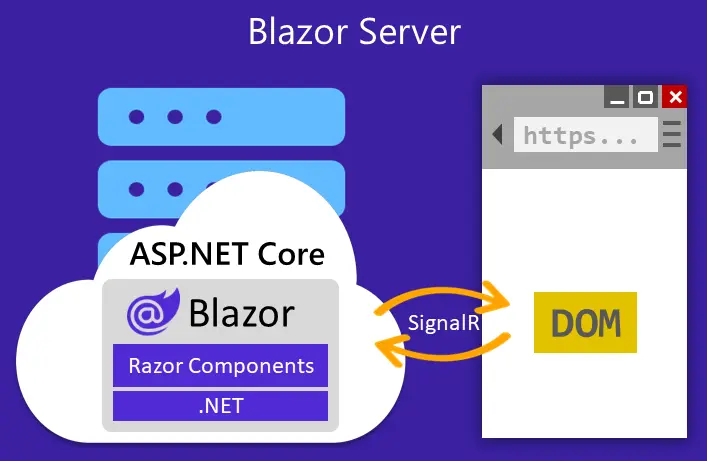
As a render mode I decided to use Interactive Server Side Render mode, because I wanted interactivity from the start and directly use my server resources without an additional API. Mode is set as global and pre-render is active for all pages. This forces my website to play nicely with SEO and users can get good first response times, and let me properly deal with pre-render caveats like double data retrieval and page flashes.
What it does is that every client accessed to your website has a SignalR connection called circuits. Circuits have information such as:
1. Component State
2. Render Tree / DOM Diff. State (Virtual DOM style)
3. Scoped DI Services
4. Authentication State (different than the normal HTTP flow)
5. Simple connection info. like connection ID, re-connection state, last activity etc.
Each and every tab you open, you get a different circuit for that tab. So keep in mind that scoped services will be unique for each tab. This is different than client side render mode too, especially for singletons where singleton won't be global for every user because client side won't be run on server but on client's browser.
People might argue about the performance due to SignalR's latency and accumulation on the server load, but for this kind of simple site it's nothing. Moreover, .NET team improved circuit connection efficiency a lot in .NET 10, it can effectively handle connections to go idle, save state and reconnect faster with using less resources and strain on the server. It can handle thousands of connections.
And for the latency, as the server renders the DOM tree and modifies it on-the-fly for the client via SignalR, let's say if you and your server are located in Europe, it's almost instantaneous from my observations. Also thanks to the underlying WebSocket that uses binary for lightweight transmissions.
Hosting
I'm using Render as a hosting service. It has a free Docker service which it also allows you to use your custom domain. I bought the domain name from Namecheap.
Configuration is very straight-forward and painless. You hook your GitHub project's commit branch into it and whenever you push your code to remote repository, it gets deployed to Render. For domain, you can follow their guide and setup your domain given the IP address put in Namecheap and verify in within just seconds, plus SSL/TLS certificate is also free.
This is my Dockerfile which Render uses to deploy my project:
# See https://aka.ms/customizecontainer to learn how to customize your debug container and how Visual Studio uses this Dockerfile to build your images for faster debugging.

# This stage is used when running from VS in fast mode (Default for Debug configuration)
FROM mcr.microsoft.com/dotnet/aspnet:10.0 AS base
USER $APP_UID
WORKDIR /app
EXPOSE 8080
EXPOSE 8081

# This stage is used to build the service project
FROM mcr.microsoft.com/dotnet/sdk:10.0 AS build
ARG BUILD_CONFIGURATION=Release
WORKDIR /src
COPY ["Directory.Packages.props", "."]
COPY ["PersonalSite.Web/PersonalSite.Web.csproj", "PersonalSite.Web/"]
COPY ["Aspire.ServiceDefaults/Aspire.ServiceDefaults.csproj", "Aspire.ServiceDefaults/"]
RUN dotnet restore "./PersonalSite.Web/PersonalSite.Web.csproj"
COPY . .
WORKDIR "/src/PersonalSite.Web"
RUN dotnet build "./PersonalSite.Web.csproj" -c $BUILD_CONFIGURATION -o /app/build

# This stage is used to publish the service project to be copied to the final stage
FROM build AS publish
ARG BUILD_CONFIGURATION=Release
RUN dotnet publish "./PersonalSite.Web.csproj" -c $BUILD_CONFIGURATION -o /app/publish /p:UseAppHost=false

# This stage is used in production or when running from VS in regular mode (Default when not using the Debug configuration)
FROM base AS final
WORKDIR /app
COPY ./PersonalSite.Web/Templates ./Templates
COPY --from=publish /app/publish .
ENTRYPOINT ["dotnet", "PersonalSite.Web.dll"]
You can generate your own easily, just don't forget to change .NET version when you upgrade, as I went from 9 to 10 lately. Also look for,
COPY ./PersonalSite.Web/Templates ./Templates
which you can force copy your files in container folder, I had to for my email templates because I disabled project's coverage for them due to some library that gives false error on templates during compilation.
Data Protection Keys
I encountered a strange problem with my application that occurred after each deploy. It got stuck on carrying out things like changing the theme, submitting forms etc. After some troubleshooting, I discovered the data protection keys which .NET uses it for encryption/decryption and signing of sensitive data is broken. If it breaks almost nothing works as I was also using protected local storage for theme selection, why is this happened?
I'm using IIS with in-process hosting for testing my application in release mode and as well as Aspire hosting while debugging in Visual Studio. None of them have this problem because those keys are stored locally. Render, however, won't let you store files, because each rebuilt on deploy deletes the key as the filesystem is temporary and doesn't have a persistent disk on free service.
So I used free Neon serverless Postgres DB, fantastic service by the way. Created my database over there, got the connection string, added to my environment variables in Render, created database context and migrated the table in production, then added this code.
if (usePostgresDp)
{
    // Register EF Core with Postgres for Data Protection
    builder.Services.AddDbContext<DataProtectionKeyContext>(options =>
    options.UseNpgsql(builder.Configuration.GetConnectionString("postgres")));

    builder.Services.AddDataProtection()
        .PersistKeysToDbContext<DataProtectionKeyContext>()
        .SetApplicationName("PersonalSite");
}
This checks if Postgres is available because I don't need this in other places such as IIS. Problem is solved.
Render's Free Limitations
Render has around 15 minutes idle time limit, then it shuts down your container instance until someone hits your site again and wait for up to 50 seconds or more to view content. I don't want to pay for a cloud service yet as what I am doing is on very small scale to justify it. So I decided to come up with a solution for this.
First, I tried cron-job.org to hit my endpoint "/ping" every 10 minutes. It was successful but sometimes Render itself was closing the server (due to maintenance I guess) and after that it wouldn't work.
I though maybe if I can simulate a real website loading, it would do the job. For end-to-end tests, there's Playwright. It can use a browser headlessly and open any website.
using Microsoft.Extensions.Logging;
using Microsoft.Playwright;
using System.Diagnostics;

var stopwatch = Stopwatch.StartNew();

using var loggerFactory = LoggerFactory.Create(builder =>
{
    builder.AddConsole();
});
ILogger logger = loggerFactory.CreateLogger<Program>();

try
{
    using var playwright = await Playwright.CreateAsync();
    await using var browser = await playwright.Chromium.LaunchAsync(new BrowserTypeLaunchOptions
    {
        Headless = true
    });

    var context = await browser.NewContextAsync();
    var page = await context.NewPageAsync();

    await page.GotoAsync("https://www.atikbayraktar.com/");

    await page.WaitForSelectorAsync(".site-footer");

    var title = await page.TitleAsync();
    logger.LogInformation("Visited site, title: {Title}", title);
}
catch (Exception ex)
{
    logger.LogError(ex, "An error occurred: {Message}", ex.Message);
}
finally
{
    stopwatch.Stop();
    logger.LogInformation("Elapsed time: {ElapsedMilliseconds} sec", stopwatch.Elapsed.TotalSeconds);
    //Console.ReadLine();
}
This, simple one class code does that. Plus, it waits until my site footer is retrievable, so that it is waiting for my site to come alive after a shut down and not stuck on Render's loading message.
I decided to use Azure Container Apps jobs for this which suits well enough as it is for containerized tasks that run for a finite duration periodically. Also I decided use Aspire for streamlining deployment. I know, a bit overkill but fun.
This is the AppHost.cs of Aspire:
using Azure.Provisioning.AppContainers;

var builder = DistributedApplication.CreateBuilder(args);

// Create the Azure Container App Environment
builder.AddAzureContainerAppEnvironment("my-env");

// Register your container instead of a project
#pragma warning disable ASPIREAZURE002 // Type is for evaluation purposes only and is subject to change or removal in future updates. Suppress this diagnostic to proceed.
var job = builder.AddContainer("playwrightmysite", "../PlaywrightMySite")
    .WithDockerfile("../PlaywrightMySite")
    .PublishAsAzureContainerAppJob((_, job) =>
    {
        job.Configuration.TriggerType = ContainerAppJobTriggerType.Schedule;
        job.Configuration.ScheduleTriggerConfig.CronExpression = "*/10 * * * *";
    });
#pragma warning restore ASPIREAZURE002 // Type is for evaluation purposes only and is subject to change or removal in future updates. Suppress this diagnostic to proceed.

builder.Build().Run();
And the regarding Dockerfile:
# See https://aka.ms/customizecontainer to learn how to customize your debug container and how Visual Studio uses this Dockerfile to build your images for faster debugging.

# This stage is used when running from VS in fast mode (Default for Debug configuration)
FROM mcr.microsoft.com/dotnet/runtime:9.0 AS base
USER root
WORKDIR /app

# This stage is used to build the service project
FROM mcr.microsoft.com/dotnet/sdk:9.0 AS build
ARG BUILD_CONFIGURATION=Release
WORKDIR /src
COPY ["PlaywrightMySite.csproj", "."]
RUN dotnet restore "./PlaywrightMySite.csproj"
COPY . .
WORKDIR "/src/."
RUN dotnet build "./PlaywrightMySite.csproj" -c $BUILD_CONFIGURATION -o /app/build

# This stage is used to publish the service project to be copied to the final stage
FROM build AS publish
ARG BUILD_CONFIGURATION=Release
RUN dotnet publish "./PlaywrightMySite.csproj" -c $BUILD_CONFIGURATION -o /app/publish /p:UseAppHost=false

# This stage is used in production or when running from VS in regular mode (Default when not using the Debug configuration)
FROM base AS final
WORKDIR /app
COPY --from=publish /app/publish .

RUN apt-get update && apt-get install -y wget apt-transport-https software-properties-common \
    && wget -q "https://packages.microsoft.com/config/ubuntu/22.04/packages-microsoft-prod.deb" \
    && dpkg -i packages-microsoft-prod.deb \
    && apt-get update && apt-get install -y powershell \
    && rm -rf /var/lib/apt/lists/*

RUN chmod -R +x /app/.playwright

# Install Playwright browsers and dependencies
RUN pwsh /app/playwright.ps1 install --with-deps

ENTRYPOINT ["dotnet", "PlaywrightMySite.dll"]
AppHost is straight forward, no need for explanation, instead of doing it in Azure, Aspire can manage the infrastructure for us (IaC). azd up in the project's folder with Powershell to provision your infrastructure and deploy to Azure, that's it.
Real problem for me was in the Dockerfile. I got errors during deployment with different configurations, this specific one works but requires you to be root user.
USER root Not very ideal but needed
RUN chmod -R +x /app/.playwright
RUN pwsh /app/playwright.ps1 install --with-deps you can change user to non-root now.
Azure Container Jobs are not completely free and turns out there's a better way. Create a workflow in GitHub Actions. It is free for public repos. but mine is private so it is 2000min/month.
This is the workflow I'm using:
name: Playwright Job Runner

on:
  workflow_dispatch:

jobs:
  run-playwright-job:
    runs-on: ubuntu-latest

    steps:
      - name: Checkout
        uses: actions/checkout@v4

      - name: Setup .NET
        uses: actions/setup-dotnet@v4
        with:
          dotnet-version: "9.0.x"

      - name: Install PowerShell
        run: |
          sudo apt-get update
          sudo apt-get install -y powershell
      - name: Cache NuGet packages
        uses: actions/cache@v3
        with:
          path: ~/.nuget/packages
          key: ${{ runner.os }}-nuget-${{ hashFiles('**/*.csproj') }}
          restore-keys: |
            ${{ runner.os }}-nuget-
      - name: Cache Playwright Browsers
        uses: actions/cache@v3
        with:
          path: ~/.cache/ms-playwright
          key: ${{ runner.os }}-pw-browsers-${{ hashFiles('PlaywrightMySite/PlaywrightMySite.csproj') }}
          restore-keys: |
            ${{ runner.os }}-pw-browsers-
      # Restore the correct .NET project
      - name: Restore
        run: dotnet restore ./PlaywrightMySite/PlaywrightMySite.csproj

      # Build so that playwright.ps1 exists
      - name: Build
        run: dotnet build ./PlaywrightMySite/PlaywrightMySite.csproj -c Release

      # Install browsers via Playwright .NET script
      - name: Install Playwright Browsers
        run: pwsh ./PlaywrightMySite/bin/Release/net9.0/playwright.ps1 install --with-deps

      # Run your Playwright job
      - name: Run the Playwright Job
        run: dotnet run --project ./PlaywrightMySite/PlaywrightMySite.csproj -c Release
This also caches the downloaded files, so it doesn't have to download again, making it efficient and fast to run.
It also has a dedicated cron-like functionality but it is not precise and breaks sometimes. Therefore, I'm using cron-job for it to trigger remotely. For that, you must create an authorization key from GitHub and use it in the Cron-job.org → Advanced → Headers as shown below:
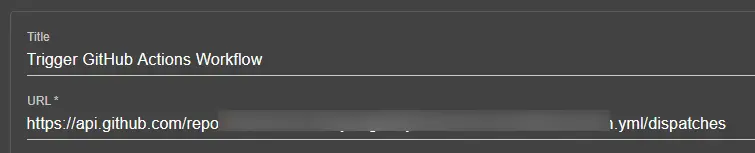
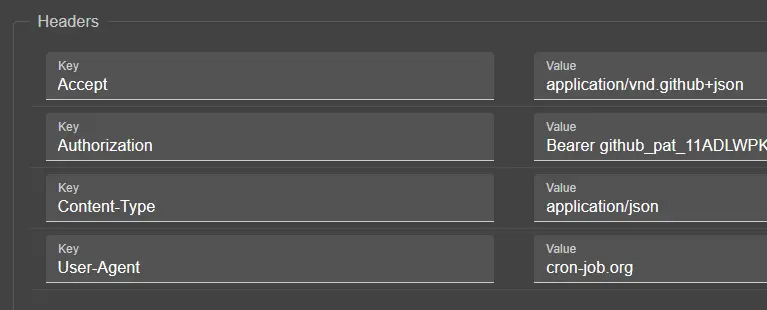
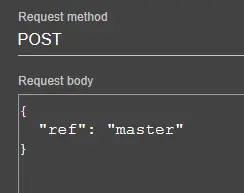
If you are going to use this trick, please don't be abusive and set the timer to very short periods. Honestly, I stopped using this and currently relying on a simple cron-job which hits my "/ping" endpoint.
Other Good Stuff
I would like to share some services and practices that are worth mentioning, which I've used in this website.
This is from Aspire's AppHost:
var builder = DistributedApplication.CreateBuilder(args);

var mongo = builder.AddMongoDB("mongo")
                   .WithDataVolume()
                   .WithMongoExpress()
                   .WithLifetime(ContainerLifetime.Persistent);

var mongodb = mongo.AddDatabase("mongodb", "PersonalSiteDb");

var mailpit = builder.AddMailPit("mailpit", smtpPort: 1025, httpPort: 8025);

builder.AddProject<Projects.PersonalSite_Web>("personalsite-web")
    .WithReference(mongodb)
    .WithReference(mailpit)
    .WaitFor(mongodb)
    .WaitFor(mailpit);

await builder.Build().RunAsync();
1. Free MongoDB Cloud: To store blog posts, messages, some logs and rate limiter status.
2. Neon Postgres Database: For storing .NET data protection keys.
3. MailKit: For testing email send/receive.
4. MailJet: For sending emails in production. Free service and works real good.
5. Google ReCaptcha: For message submission authenticity.
6. AbstractAPI: For email validation after checking with regex on the client-side.
Also worth mentioning is my architecture, it resembles vertical slices where I have one project and components, services, DBContexts, models etc. have their own folder. Plus, composition root is tidy with builder pattern codes are in extension classes elsewhere. Result pattern is used between razor components and services. More cohesive, less coupled, increasing maintainability and clean code.
Conclusion
Thanks for reading it to the end! 🥳 I hope you enjoyed it.
For future posts, I plan to get into more in Blazor render modes, dealing with pre-render, state management and DI scopes. Also, authentication is another beast in client vs. server side as it differs.
I also plan to get deep on some of the things that I've done while building this website. Such as, rate limiting, CSP setup for the project and so on. Plus, I like to write about clean code, design patterns and principles that make software testable, maintainable and easy to understand.
Till then, take it easy!